



Desk clutter, tangled cables, a cramped mouse pad
A small plain pad can't keep up with a full RGB setup, and loose charging cables pile up around your keyboard. This mat gives you one big surface plus an optional built-in charging zone, so cables and clutter stay off your desk.
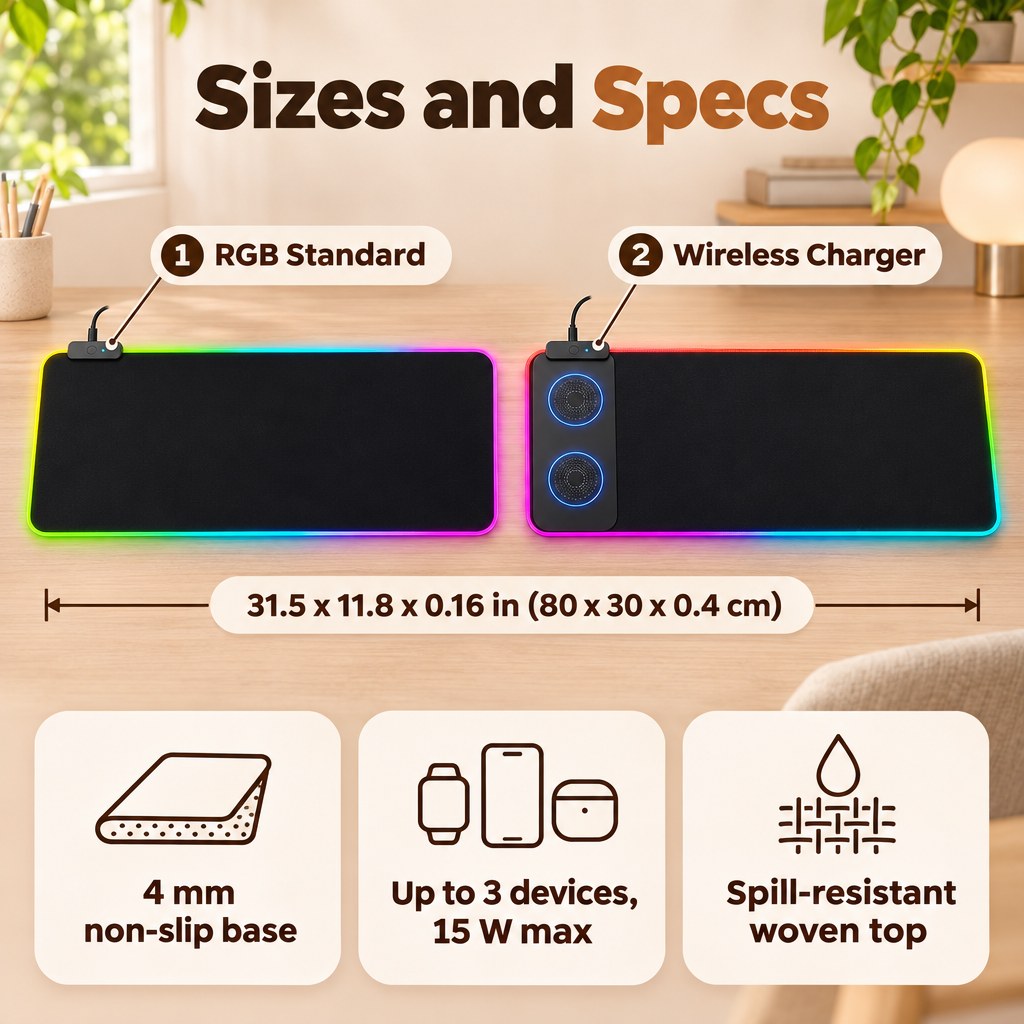
- Oversized 31.5 x 11.8 in surface holds your mouse and keyboard together
- Built-in RGB edge lighting syncs to your game or music audio
- Optional wireless charging zone replaces three separate charging cables

What it does, and how
Five things built into one desk mat, plus one honest limit.
Sound-reactive edge lighting
Smart audio sensors read your game or music and pulse the RGB edge lighting in sync, in real time.
Tri-device wireless charging
The Wireless Charger version has marked zones that charge a phone (up to 15 W), a watch (up to 2.5 W) and earbuds at the same time.
Room for your whole setup
At 31.5 x 11.8 in (800 x 300 mm), the mat holds a full-size keyboard and mouse with space to spare.
Smooth woven surface
A high-density woven fabric top gives low-friction glide and wipes clean, with beaded water droplets instead of soaking in.
Non-slip rubber base
A textured rubber base up to 4 mm thick keeps the mat in place during fast swipes and adds a bit of wrist cushion.
What it doesn't do
It's spill-resistant, not waterproof, so don't submerge or soak it. The RGB Standard version doesn't include wireless charging, and charging speed depends on the device, not a dedicated fast charger.
Fits right into your gaming setup
A few scenes of the mat in daily use.


Who this desk mat is for
Great for
- You want one big RGB-matched surface for mouse and keyboard
- You own Qi-compatible devices and want fewer cables on your desk
- You like audio-reactive lighting synced to music or games
- Your desk setup already leans black and RGB
Not the right pick if
- You need a fully waterproof mat for drinks or spills
- You don't own any Qi-compatible phone, watch or earbuds
- You want a tiny pad that fits in a bag

Edge lighting that reacts to your audio
Smart sensors in the edge strip read your game or music audio and shift the RGB colors in sync, without any app or software needed.
- Sound-reactive mode pulses with audio automatically
- Button on the control module cycles through RGB modes
- Wireless charging zones sit flush in the corner module (Wireless Charger version)
Desk mat, basic pad or a separate charger?
How this mat stacks up against what most desks already have.
| This mat | Basic mouse pad | Separate wireless charger | |
|---|---|---|---|
| Full desk coverage (800 x 300 mm) | ✓ | ✕ | ✕ |
| Audio-reactive RGB edge lighting | ✓ | ✕ | ✕ |
| Charges phone, watch and earbuds together | ✓ | ✕ | ✓ |
| Non-slip rubber base | ✓ | Varies | ✓ |
| No cable or USB port needed | ✕ | ✓ | ✕ |
| Spill-resistant woven surface | ✓ | Varies | ✕ |
Get the most from your new mat
A few things to check in your first few uses.
Plug it in first
Connect the USB cable to a powered port before expecting the RGB lighting or charging zones to turn on.
Check device compatibility
Only Qi-compatible phones, watches and earbuds charge wirelessly; confirm your device supports Qi before relying on the charging zone.
Keep it dry
Wipe spills right away with a damp cloth and let the mat air dry fully before plugging the USB cable back in.

Everything in one roll-up mat
- 1 x RGB gaming desk mat (version as selected)
- 1 x USB cable
- Wireless Charger version: integrated wireless charging zone (no separate charging pad needed)
What happens after you order
Ships in 1–2 business days
Orders are processed Monday to Friday, excluding holidays.
Tracked delivery
Usually 5–8 business days after shipping, with a tracking number for every order.
Damaged or wrong item?
Free returns within 15 days of delivery. Damaged or wrong item? We replace or refund it.
What people ask most
Will this mat fit my desk and keyboard setup?
At 31.5 x 11.8 in (800 x 300 mm), it's sized to hold a full-size keyboard and mouse side by side, with room left over for a wrist rest or notebook.
How does the wireless charging zone work, and what can I charge?
The Wireless Charger version has marked zones for up to 3 Qi-compatible devices at once, outputting up to 2.5 W for a watch and up to 15 W for a phone. Devices aren't included.
Is it safe to leave the RGB lighting and charging running?
The mat connects over USB like any desk peripheral, and the charging module sits in a raised, separate section from the woven surface. Don't submerge or soak the control module.
How do I clean the mat?
Wipe the woven surface with a damp cloth. Don't submerge or soak the corner control/charging module, and let everything air dry fully before reconnecting the USB cable.
What's included in the box?
You get the desk mat (RGB Standard or Wireless Charger version, as selected) and a USB cable. The Wireless Charger version has its charging zone built into the mat, so there's no separate pad.
What's the difference between the RGB Standard and Wireless Charger versions?
Both versions have the same oversized mat, woven surface and sound-reactive RGB edge lighting. Only the Wireless Charger version adds the built-in zones that charge your phone, watch and earbuds.


Recensioni
I bestseller di cui tutti parlano
Da TikTok a casa tua: guarda e acquista subito i nostri prodotti più popolari

Lampada LED Medusa – Luce notturna RGB ad attivazione vocale che cambia colore →

Macchina Mini Claw Operata a Moneta Standard per Gioco da Arcade per Bambini con Premi in Peluche →

Mini microscopio portatile 1000X per bambini - Giocattolo scientifico STEM per esterni, strumento da laboratorio tascabile da 2,0 pollici →

Set da gioco interattivo per bambini con lavandino, rubinetto ad acqua circolante e 19 accessori per il gioco di ruolo →

Maschera Cosplay Deadpool a Testa Intera Traspirante per Adulti - Accessorio Costume Halloween 2025, Design in Lattice Rosso e Nero →

Mini console per videogiochi retrò con 20.000 giochi classici, uscita 4K HD, doppi controller wireless →

Tavola di Apprendimento Occupata Montessori per Bambini - Giocattolo Attività per Abilità Motorie Fini, Regalo di Natale Perfetto per Età 1-4 →

