



A desk printer for two pages a month
A desktop printer takes a permanent corner of the room, dries out between jobs, and asks for another cartridge the one week you finally need a page. And it only prints where it's plugged in.
- No cartridges or toner — heat on thermal paper makes the page
- A bar-shaped body that lies flat in a backpack sleeve or a drawer
- A 2000 mAh battery, so it prints with no outlet in reach

What it does, and how
Five things the printer actually does, and one thing it doesn't.
Heat instead of ink
The print head forms the image on thermal paper. There's no cartridge bay, no toner and nothing to refill — you just load a sheet.
Prints from your phone
Pair over Bluetooth or plug in the USB cable, open the companion app, pick a file and tap print. Works with iOS, Android, Windows and macOS.
Full-size pages, three formats
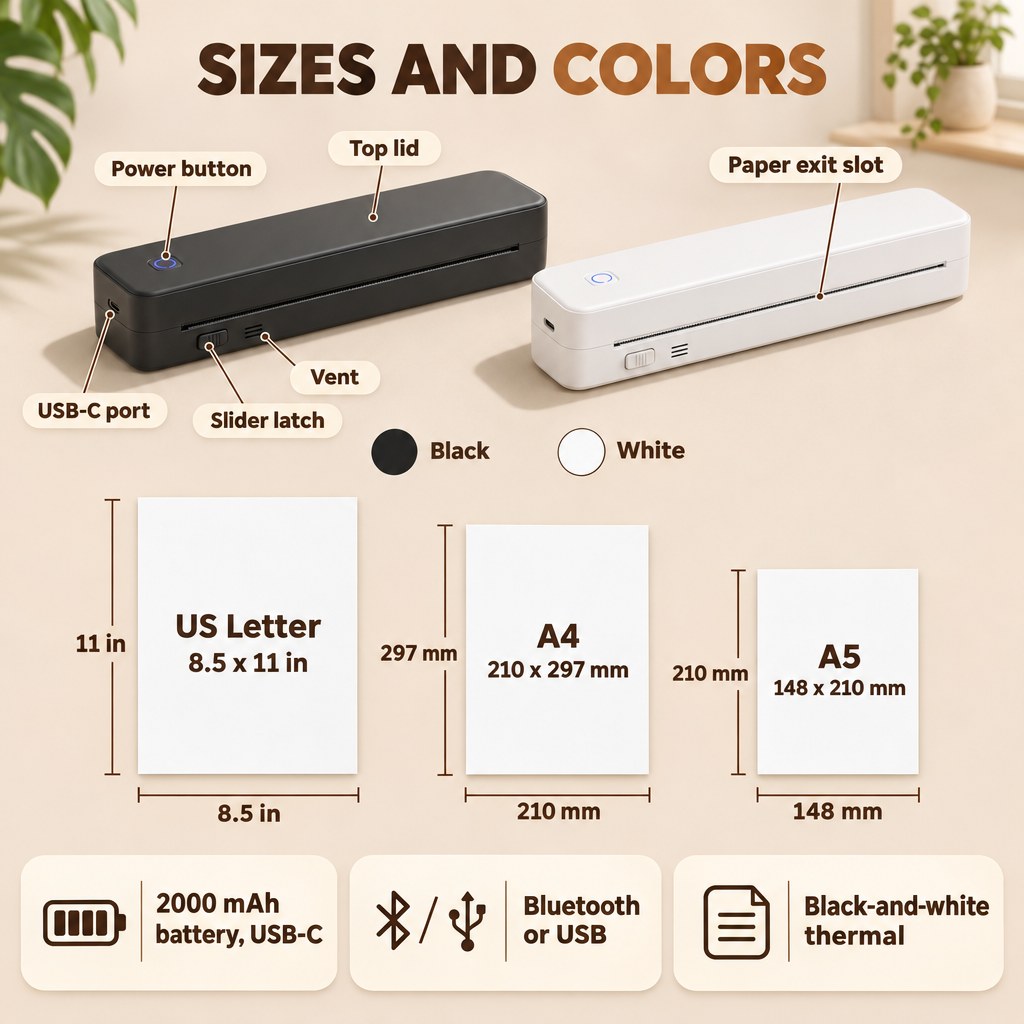
Letter, A4 and A5 sheets exit flat at normal reading size, so contracts, invoices and boarding passes don't land on a receipt strip.
2000 mAh battery, USB-C
Up to about 200 pages per charge, topped up with the same cable style as your phone. Print in a car, a hotel room or a waiting area.
Bar-shaped and bag-sized
A flat rectangle you can hold in one open hand. It slides into a backpack sleeve or a desk drawer instead of owning a corner of the room.
What it doesn't do
It prints in black and white only, on thermal paper in the supported sizes — not on ordinary copier or photo paper. It doesn't scan, copy or fax, and it isn't built for long unattended print runs.
Fits into a normal workday
Three moments where a full-size page is needed and no desktop printer is around.


Who this printer is for
Great for
- You print a few pages a month, not every day
- You work from cars, hotels and coffee shops
- Your desk has no room for a desktop printer
- You print contracts, invoices, notes and boarding passes
Not the right pick if
- You need color prints or photo-quality images
- You want to print on ordinary copier paper
- You need scanning, copying or long unattended print runs

A slot that runs the full front edge
The seam between the lid and the base is the paper path, so a full-size sheet comes out flat instead of curling off a roll.
- Feed one thermal sheet into the front slot; the page exits horizontally
- One small round button on top powers it up and glows when it's ready
- A single USB-C port on the end charges it — no power brick to pack
This printer, a desktop inkjet or a print shop?
What each option actually gives you when you need a page now.
| This printer | Desktop inkjet | Print shop | |
|---|---|---|---|
| No ink or toner to replace | ✓ | ✕ | ✓ |
| Fits in a backpack sleeve | ✓ | ✕ | ✕ |
| Prints straight from your phone | ✓ | Varies | ✕ |
| Works with no outlet nearby | ✓ | ✕ | ✕ |
| Nothing to collect or travel to | ✓ | ✓ | ✕ |
| Color printing | ✕ | ✓ | ✓ |
| Prints on plain copier paper | ✕ | ✓ | ✓ |
Tips for a clean first print
Three things worth doing before the page actually matters.
Charge it fully first
Top it up over USB-C before the first job, so pairing and the first pages don't drop halfway through.
Feed one sheet
Slide a single thermal sheet into the front slot and never force it. The printer takes one page at a time.
Do a test page
Print a sample at home before a trip, so you know the app, the paper side and the power button by heart.

Everything you need to print today
- 1× Inkless portable printer
- 1× USB-C charging cable
- 1× Starter pack of thermal printing paper
- 1× Quick setup guide
- 1× Printer box
What happens after you order
Ships in 1–2 business days
Orders are processed Monday to Friday, excluding holidays.
Tracked delivery
Usually 5–8 business days after shipping, with a tracking number for every order.
Damaged or wrong item?
Free returns within 15 days of delivery. Damaged or wrong item? We replace or refund it.
What people ask most
Will it work with my phone or laptop?
It connects over Bluetooth or a USB cable and works with iOS, Android, Windows and macOS through the companion app. You don't need a Wi-Fi network or a computer in between — phone, app, print.
How long does a charge last, and how do I recharge it?
The built-in 2000 mAh battery prints up to about 200 pages per charge, depending on how dense your pages are. Recharge it over USB-C with the included cable, the same cable style as most phones.
What paper does it use?
Thermal paper in Letter, A4 or A5. It won't print on ordinary copier or photo paper. Thermal prints can fade with heat, sunlight or friction over time, so keep a digital copy of anything important.
Does it print in color?
No. It prints black and white only, which covers documents, contracts, invoices, tickets, notes and line art. It also prints only — it doesn't scan, copy or fax.
How do I clean and store it?
Wipe the housing with a dry or barely damp soft cloth, no solvents. Keep the paper slot free of dust, store it closed with no paper inside, and recharge every few months if it sits unused. It isn't waterproof — keep it dry.
What's in the box?
The printer, a USB-C charging cable, a starter pack of thermal printing paper, a quick setup guide and the printer box. Choose black or white, and the Original or Upgraded design, at checkout.


Reseñas
Los más vendidos de los que todo el mundo habla
De TikTok a tu puerta — mira y compra nuestros productos más populares al instante

Lámpara LED de medusa: luz nocturna RGB que cambia de color y activada por voz →

Máquina de Garra Mini de Monedas Estándar para Niños, Juego de Arcade con Premios de Peluche →

Mini microscopio portátil 1000X para niños, juguete científico STEM para exteriores, herramienta de laboratorio de bolsillo de 2,0 pulgadas →

Juego de fregadero interactivo para niños con grifo de agua circulante y 19 accesorios para diversión de juego de roles →

Máscara de Cosplay de Deadpool de Cabeza Completa Transpirable para Adultos - Accesorio de Disfraz de Halloween 2025, Diseño en Látex Rojo y Negro →

Mini consola de juegos retro con 20.000 juegos clásicos: salida 4K HD, controladores inalámbricos duales →


